
On this page
Hub by the door, Show in the kitchen?
- Choose Hub for frequent taps on lights, cameras and routines near the door; treat its calendar as a secondary view.
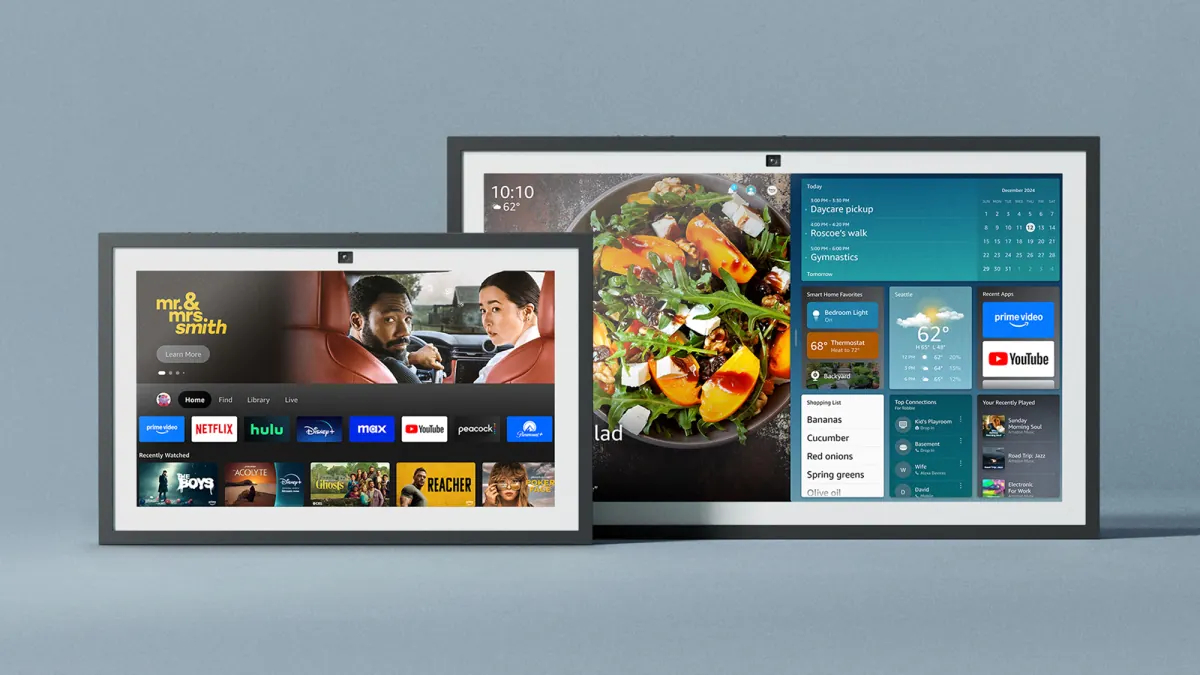
- Choose Show 15 or 21 when a larger schedule area, video calls and kitchen entertainment justify the extra space.
- For a schedule that must remain the main view, compare a dedicated calendar before buying either Echo.
What changes when the calendar is the main job?
An entryway panel answers “are the lights off?” while someone is standing beside it. A family calendar answers “who is collecting the children?” as people pass through the room. Those are different viewing tasks. Our preference is Hub for the first job and a larger Show for the second, provided its home-screen layout keeps the schedule useful.
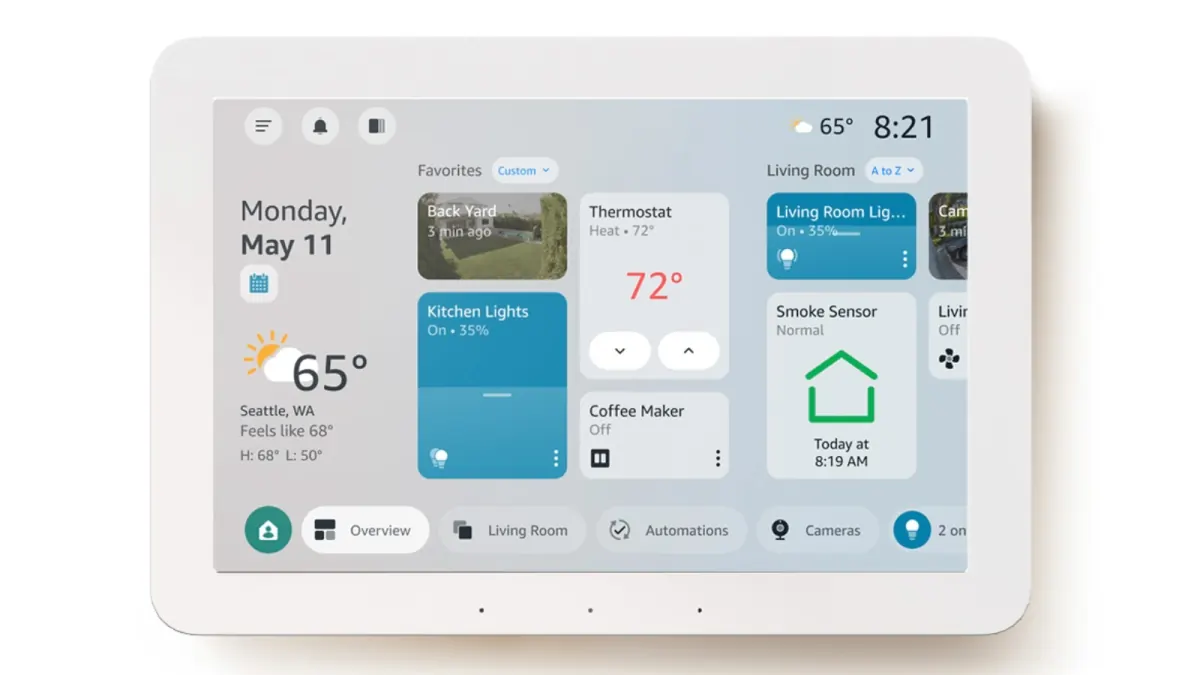
- Hub has an 8-inch, 1280 × 800 screen. Its compact layout suits close interaction; screen size alone cannot establish a readable viewing distance.
- Amazon documents calendar and to-do information on Hub. Its current dashboard image shows a calendar shortcut, rather than a full family week occupying the screen.
- The Show comparison here means the 2024 Echo Show 15 and Echo Show 21. Smaller Shows and earlier generations have different hardware.
| Buying question | Echo Hub | Echo Show 15 / 21 | Sources |
|---|---|---|---|
| Main role | 8-inch wall control panel; calendar alongside home controls. | Larger wall display; calendar widgets alongside media and other information. | Amazon UK: Hub calendar and family useAmazon: 2024 Echo Show 15 and 21 |
| Smart-home hardware | Zigbee, Matter and Thread support. | The 2024 models also support Zigbee, Matter and Thread. | Amazon: Echo Hub announcementAmazon: 2024 Echo Show 15 and 21 |
| Calls and video | No built-in camera; remote camera feeds are a separate feature. | Camera for video calls and built-in Fire TV. | Amazon: Echo Hub product detailsAmazon: 2024 Echo Show 15 and 21 |
| Best placement | Our pick for close-up controls beside a doorway. | Our pick for a kitchen where schedule and entertainment share a screen. |
Placement recommendations are our assessment of the documented roles, not measured legibility results. A larger screen does not guarantee a permanent full-screen calendar.
Sources: Amazon: Echo Hub product detailsAmazon UK: Hub calendar and family useAmazon: current Echo Hub interface and featuresAmazon: 2024 Echo Show 15 and 21
Connect the calendar before committing to a wall position
Amazon’s current instructions use Alexa app → More → Settings → Preferences → Calendar. Select the provider offered in your app, continue through authorization, and repeat for the calendars you need. Provider availability can vary; use the app’s list rather than assuming every account type is supported.
- For Google, Apple/iCloud or Microsoft households, first confirm the actual account appears in Calendar settings. A work account may have administrator restrictions.
- Create a harmless “Family test” event in the source calendar, then change its time. Check both the spoken answer and the on-screen result before relying on it for pickups.
- When adding an event through Alexa, confirm it lands in the intended calendar on your phone. One successful read does not establish reliable write-back for every shared calendar.
- If events are missing, check the linked account and original event. For wrong times, compare calendar and device time zones. For iCloud, confirm the phone calendar is actually synced to iCloud.
Sources: Amazon support: link calendars to AlexaAmazon support: missing events and wrong times
Family sharing needs more than a linked account
Amazon says calendars are no longer shared automatically across adults in Amazon Family. Other accounts need their own links or account switching. Voice ID can select calendars for spoken responses, but that is not a promise that a shared screen conceals private appointments.
- Use a separate household calendar for school runs, appointments and visitors, keeping sensitive work or medical details off a hallway screen.
- Amazon states that linking stores a calendar copy in the cloud and that people using Alexa devices may access its content.
- A useful handoff names a person as well as a time: “Sam collects Mia — 4 pm.” Neither a calendar tile nor an AI reply proves someone has accepted that job.
Can Hub keep working when Wi-Fi goes down?
Amazon promises control of select lights, switches and plugs during an internet outage. That is narrower than “the house works offline.” Losing the internet connection while the router stays on is also different from switching the router off: the latter removes the local Wi-Fi network used by some devices.
- Zigbee or Thread support does not prove every device, scene, voice command or routine works without internet. Pairing path and cloud services still matter.
- The offline claim does not establish fresh calendar sync, camera access or Alexa+ availability during an outage.
- A practical return-window check is to disconnect the router’s internet feed while leaving the local network and devices powered, then try a directly paired light by touch. Test router failure separately and keep physical switches usable.
Subscriptions, AI and the three-year cost
Separate the panel from the services. Basic calendar linking is documented independently of Alexa+. Amazon’s US Alexa+ terms provide the full service with Prime, or for $19.99 per month without Prime; the free non-Prime chat tier is for the app and web. An introductory device offer is not a permanent free AI plan.
- Alexa+ can turn emailed school schedules into calendar entries, according to Amazon. Review the resulting dates and people before treating an import as the family plan.
- Ring recording, snapshots, alarm integrations and AI camera features can have separate paid requirements. The Hub listing specifically qualifies Ring snapshots and digital alarm integration; owning the screen does not include every security service.
- Budget for power and cable routing, any stand or compatible PoE adapter, installation and chosen services. Hub is not a cable-free wall calendar.
| Scenario | Hardware reference | Three full years of optional Alexa+ without Prime | Sources |
|---|---|---|---|
| Echo Hub | $179.99 announced price | $719.64 service + hardware = $899.63 | Amazon: Echo Hub announcementAmazon: US Alexa+ plans |
| Echo Show 15 (2024) | $299.99 announced price | $719.64 service + hardware = $1,019.63 | Amazon: 2024 Echo Show 15 and 21Amazon: US Alexa+ plans |
| Echo Show 21 (2024) | $399.99 announced price | $719.64 service + hardware = $1,119.63 | Amazon: 2024 Echo Show 15 and 21Amazon: US Alexa+ plans |
These are reference-price calculations, not live offers or required calendar fees. Service example: $19.99 × 36 paid months, with no trial, tax or price changes. Existing Prime members have no additional Alexa+ charge under the cited US terms; Prime itself has a cost. Ring and media services are excluded.
Sources: Amazon: US Alexa+ plansAmazon: Echo Hub product detailsAmazon: Echo Hub announcement
Photos and the screen’s competing jobs
Hub supports Amazon Photos and uses infrared sensing for Adaptive Content, switching toward controls as someone approaches. That makes it interesting as an ambient photo panel, but approach behavior is not evidence that the calendar stays visible. Show 15/21 also support photo slideshows, with more screen area for a shared room.
- Keep the original photo library separately. Full-resolution cloud storage is different from display resolution, color accuracy and cropping quality.
- Try a portrait, a group photo with faces near the edges and a dark indoor shot. Check the crop and reflections at the actual mounting position.
- When the schedule is the priority, return to the home screen after photos, a camera view and a voice request. Count the taps needed to see the next pickup again.
Sources: Amazon: current Echo Hub interface and featuresAmazon: 2024 Echo Show 15 and 21
The placement check that matters more than a spec sheet
Owner discussions repeatedly combine three needs: a child-readable calendar, cameras and grocery lists. They also raise interruptions and advertising on Show screens. Those reports identify useful checks, not a universal result for every software version or account.
- Stand where you normally put on shoes or prepare lunch. Can you identify the next event, time and responsible adult without moving closer?
- Leave the screen untouched, then approach it. Does the needed schedule remain available, or does the display change to another job?
- Repeat after a software update or layout change. Amazon’s redesigned Hub dashboard means launch-era widget screenshots are not an exact setup guide for every current unit.
Sources: Owner discussion: Hub versus Show for family useAmazon: current Echo Hub interface and features
Our verdict
- Buy Hub when close-up home controls justify the panel even if calendar viewing remains secondary.
- Buy Show 15/21 when a larger shared view and kitchen media are worth the space and interruptions are acceptable.
- Keep an existing Show first if it already handles the required controls. A second panel is worthwhile only if its location removes a repeated daily inconvenience.
- Choose a dedicated calendar instead when the household needs a persistent schedule above everything else.
For a schedule-first screen, see smart calendar frame versus Echo Show.
Common questions
Can Echo Hub be used as a family calendar?
Yes. Amazon documents calendar information alongside home controls. For a busy family schedule, the key limitation is the compact screen and the space given to controls. Check the current layout at your normal viewing position before using it as the main calendar.
Is Echo Hub better than Echo Show for a wall calendar?
Hub is our choice for an entryway control panel with occasional calendar checks. Show 15 or 21 is the stronger Amazon option when a larger schedule view and kitchen media matter. For an uninterrupted calendar, compare a dedicated calendar display.
Do you need Alexa+ for a calendar?
Amazon documents standard calendar linking separately from Alexa+. The paid AI service adds broader assistant capabilities; it should not be treated as a compulsory calendar subscription. Check any introductory offer and the account’s current service terms.
Will the calendar sync without internet?
Do not rely on that. Amazon’s select-device offline control promise does not establish offline calendar updates. Keep a phone or another accessible copy of important appointments.
Sources
- Sources checked October 28, 2026. Hardware prices above are historical announced US reference prices, not checkout quotes.
- The comparison uses the 8-inch Echo Hub and 2024 Echo Show 15/21. Interface images are supplied by Amazon. Recommendations reflect household use cases; no hardware score is assigned.
Related reading
When the calendar is the priority
Compare a shared schedule with a broader household command center.
Compare the room’s main job
- Family Command Center or Calendar Frame?Choose a shared home screen by the problem it must solve: visible schedules, task ownership, family photos, or a configurable information wall.
- Smart Calendar Frame vs Echo ShowHow to compare a dedicated smart calendar frame with an Echo Show-style voice display before a kitchen helper gets mistaken for a true family calendar wall.