
Manufacturer-documented · unscored / Updated October 24, 2026
Bozztek CPF2708: A 27-inch Calendar with Optional Sensors
 Bozztek
The 27-inch Zicalstar calendar offers optional light and infrared sensors. Compare its configuration, screen behavior and household costs before choosing.
A wall calendar that stays bright after everyone leaves the kitchen is solving only half the room problem. Bozztek’s CPF2708 pairs a 27-inch Zicalstar calendar with optional ambient-light and human-infrared sensors. The important buying detail is “optional”: the model name alone does not guarantee either sensor, or a particular wake-and-sleep routine.
Quick answer
- The CPF2708 is a 27-inch calendar display using Zicalstar software, with desktop and wall-mount configurations.
- The specification table marks the light sensor and 4.5-metre infrared detector as options. Confirm both in the selected hardware configuration.
- Automatic brightness, scheduled sleep and motion-triggered wake serve different needs. Skylight also documents automatic brightness on its 15-inch Calendar; that feature adjusts brightness rather than establishing motion-triggered sleep.
Product media
CPF2708 · 27-inch Calendar Frame visual evidence
1 product image
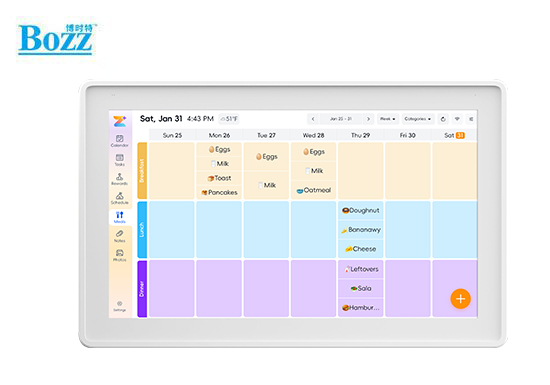
Manufacturer specifications
CPF2708 specifications
Updated October 24, 2026
Does it solve the always-on calendar problem?
It offers hardware that could address it, but a sensor specification is not proof of a finished screen-control experience. Ambient light sensing can help brightness follow the room. Infrared sensing can supply a movement signal. Firmware still decides what happens next: when to wake, how long to stay awake and whether a night schedule takes precedence. The published range does not establish those timings or the false-wake rate.
- For a bedroom or open-plan living area, the useful outcome is a comfortable dark-room screen and predictable sleep, rather than the widest advertised lux range.
- For a kitchen, quick wake matters: the schedule should become readable during a brief glance, without requiring a tap.
- A motion detector is not proof of continuous occupancy detection. A seated, still person and someone passing a doorway present different use cases.
Light dimming, idle sleep and motion wake are different
A Reddit discussion about Skylight describes a specific frustration: a child wakes the screen, walks away and leaves it on. Other participants prefer an always-visible calendar. Those are different household preferences, not evidence that every calendar has the same fault. Skylight’s support documents a light sensor and an Automatic Brightness toggle on its 15-inch model, alongside separate scheduled sleep and tap-to-wake instructions.
- Auto brightness changes how bright the lit screen is. It need not turn the panel off.
- Scheduled sleep follows the clock. It need not respond to an empty room during the day.
- Motion wake responds to detected movement. Its usefulness depends on placement, delay and the ability to stay dark when desired.
- A fair comparison uses the exact Skylight generation and enabled settings; the 15-inch support article does not establish sensor hardware in every Max or Calendar 2 configuration.
What to look for in a sensor demonstration
If automatic screen control is your reason for buying, ask the supplier to show the sensor-equipped configuration you would receive. Focus on how it behaves in a room like yours: comfortable brightness, a readable calendar when you approach and darkness when you want it.
- Dimming: is the lowest brightness comfortable at night, and does it change smoothly as room lighting changes?
- Approach: is the calendar readable when you enter from your usual doorway, without needing a tap?
- Quiet reading: does the screen stay readable while someone sits still, then sleep after the room is empty?
- Unwanted wakes: could pets or people passing in the hallway turn it on?
- Night settings: can the screen stay dark during scheduled sleep, even when someone walks past?
Will calendar edits reach everyone’s phones?
Zicalstar’s current guide distinguishes account-based one- or two-way connections for Google, Outlook and iCloud from read-only ICS subscriptions such as Cozi and TeamSnap. A new event must target the connected calendar to write back; an event saved only in Zical stays there. Our calendar sync guide explains why the connection direction matters more than a row of provider logos.
- For a shared household, choose the calendar that remains the source of truth before inviting everyone to maintain another one.
- An invitation list, a recurring school event and a last-minute cancellation are useful examples to try across the display and two phones.
- Treat public calendar links as sensitive access links. For work accounts, organizational permissions can also limit connections.
Family planning and AI: the software is only part of the purchase
Zical’s guide covers member profiles, tasks, rewards, meals, notes and AI input through text, voice, images or links. Available tools depend on the software version and account plan supplied with the device. Microphones are optional on the CPF2708, which matters if you want to speak to the display. The Zical Agent guide explains the family-planning tools and their limits.
- For chores, agree who assigns tasks and who approves rewards. A bigger screen does not remove that family responsibility.
- Review AI-created dates, people and recurring events before relying on them. AI input is a convenience, not evidence that an imported school timetable is correct.
- Compare the named software version and included services in the exact offer.
How good will photos look on a 27-inch 1080p panel?
A 1920 × 1080 image spread across 27 inches works out to about 82 pixels per inch, calculated from the published diagonal and resolution. That is a density figure, not a photo-quality score. A large panel can make calendar text easier to see across the room, while close viewing may expose softer photo detail. Brightness uniformity, reflections, color and viewing angles still affect the result.
- Zical’s guide describes phone uploads of photos and videos, with cropping and rotation tools. Sending a file successfully and displaying it well are separate questions.
- For a photo-heavy household, inspect a face, a dark image and a portrait crop at the distance where the frame will actually sit.
- A screensaver still lights the panel. Choosing photos during inactivity does not provide the same dark-room result as turning the display off.
Subscription boundaries and the long-term bill
Bozztek offers the CPF2708 in different hardware configurations. Compare the supplier’s written device offer with the software services included for your account, including any recurring charges. Our subscription-cost guide separates hardware cost from recurring services.
- Three-year ownership cost is the delivered hardware price, installation and accessories, paid services during those years, and electricity. For five years, use five years of each recurring item alongside the one-time costs.
- As an illustration, a $5/month optional service adds $180 over 36 paid months or $300 over 60 paid months. Those are arithmetic examples, not Bozztek or Zicalstar prices.
- The 36W specification is a maximum rating. It cannot establish typical consumption or sensor energy savings; those need on, dimmed and sleeping power measurements plus the hours in each state.
- Confirm the selected memory, sensors, stand or wall bracket, delivery destination, warranty and return eligibility in the offer. A manufacturer specification page is not a stock or checkout guarantee.
Who should keep it on the shortlist?
The CPF2708 may suit a household looking for a large Zicalstar calendar with optional room-sensing hardware. The supplier’s configuration and demonstration matter if automatic screen control is essential: the published ratings alone do not establish wake speed, smooth dimming or unwanted wakes. The Bozztek device details explain the configuration; the Westsee review covers a separate Zicalstar-powered display.
Zicalstar calendar hardware
Match the screen behavior to your room.
Explore the exact sensor options, connected software and household costs together.
Software, model and costs
- Bozztek CPF2708 model detailsExact model, software relationship and optional sensors.
- Zicalstar and connected devicesCompare the software platform with its named hardware.
- Compare ownership costsSeparate hardware, services and recurring fees.