
App available / Hub pre-order announced / Updated October 24, 2026
Nestify App & Family Hub Product Watch
Nestify
Nestify app features, Hub pre-order prices, subscription terms and privacy considerations for a shared family display.
Nestify offers a family organizer for phones and tablets, plus a separate 15.6-inch Nestify Hub now listed for pre-order in its official shop. The app is listed on both Apple App Store and Google Play. The shop lists a $22.90 Standard deposit and a $229 Standard pre-order price, while delivery is described only as expected before Black Friday 2026. Families should still check the final checkout, regional availability, shipping, returns and warranty terms before treating that estimate as a delivery promise.
On this page
Quick answer
- The app is available for iPhone, iPad and Android. Store descriptions cover shared calendars, tasks, shopping lists, recipes and voice input.
- Nestify now lists a 15.6-inch Hub for pre-order in its official shop. The stated Standard price is $229, with a $22.90 deposit; the shop says the remaining balance is charged November 20, 2026 and describes shipping as expected before Black Friday 2026.
- Included software terms are not consistent across official sources. Live shop HTML checked October 22 shows three months of Plus at a displayed later price of $8/month and one month of Pro, while the product description still says lifetime Plus and another payment-plan description says a first year. Confirm the selected offer rather than assuming a lifetime entitlement or renewal term.
Product media
App & Family Hub visual evidence
1 product image
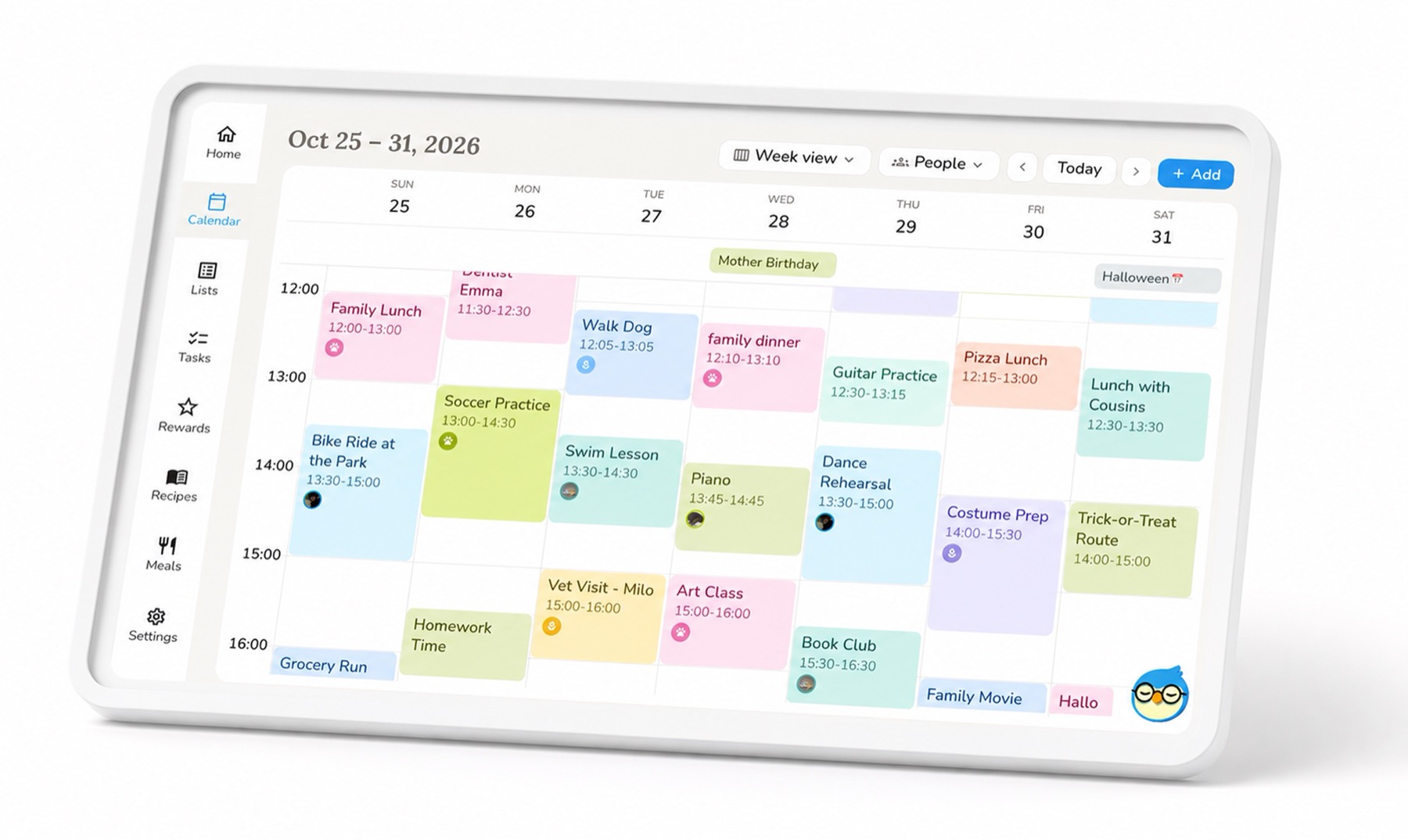
Product details
Hub and app details
Updated October 24, 2026
Can you buy a Nestify calendar display?
Nestify directs its device URL to an official shop with a 15.6-inch Hub pre-order. Live shop HTML checked October 18 lists a $22.90 deposit and a $229 Standard price, while the structured description says a $24.99 Standard deposit. Product data also lists Soft-touch at $279 with a $27.99 deposit plan. The shop names November 20 for the remaining charge and uses estimated Black Friday shipping or arrival language. Confirm the selected offer; these manufacturer statements are not evidence of shipped hardware or a guaranteed delivery date.
- The official listing identifies the Hub as a 15.6-inch home display and says taxes and shipping are calculated at checkout.
- Check country eligibility, the live checkout total, shipping, returns and warranty before placing an order.
What the app offers today
The store descriptions combine family calendars, shared lists, tasks and meal planning. Voice input is a prominent feature. Apple release notes also describe importing information from photos and forwarded emails.
- An existing phone or tablet offers a way to explore the software before committing to a dedicated display.
- The Family Hub website lists Google, Apple and Outlook calendar connections, but says Nestify events do not write back to Google or Outlook. Apple connection direction is not established by that statement; confirm the connection method before relying on it.
- Compare the connection direction, recurring events and family permissions with the calendars you use.
- The Apple US storefront checked October 23 lists version 1.9, released October 22, 2026. Its release notes describe an interface redesign.
Plus and Pro in the current Hub pre-order
Earlier shop wording offered lifetime Plus and a first-200 Pro bonus. On October 22, live shop HTML instead displays three months of Plus followed by a displayed $8/month price, plus one month of Pro at a displayed $80/month. The structured product description still says lifetime Plus, while one Soft-touch plan says a first year. These conflicting descriptions do not establish one confirmed bundle or renewal outcome. Plus is described as covering family commands, imports and meal plans; exact eligibility, included duration and later charges depend on the offer confirmed for your order.
- Pro is described as adding conversational interaction, faster replies, web search and proactive follow-through.
- Confirm offer eligibility, renewal terms and the final checkout price before accepting a trial. These hardware-bundle terms should not be assumed for every mobile-only subscription. Read the dated pre-order report for the source differences.
Privacy details to check before connecting family data
Nestify says raw voice recordings are not retained after processing, but its privacy policy allows transcriptions to be retained and requests to be processed by third-party AI or speech providers. Local voiceprint storage should not be read as a promise that all AI processing stays offline.
- The checked privacy policy describes encrypted connections and cloud storage encryption, while Google Play displayed a conflicting encryption disclosure. These sources do not give a consistent account of encryption across the service; neither statement is an independent security test.
- Review calendar permissions and deletion controls before adding sensitive household information.
Who should consider it now?
Nestify may interest families who want to try a shared organizer on devices they already own or are comfortable evaluating a new display through its stated pre-order terms. Anyone who needs a wall calendar by a fixed date should verify the current checkout and delivery terms rather than rely on the estimated shipping window.
- This Product Watch tracks the app and Hub pre-order; they do not yet have a SmartFrame Score.
- For a time-sensitive purchase, use the current delivery estimate, return terms and selected subscription offer.
October 8, 2026: official pre-order terms appear
The original September source check found a beta waitlist. On October 8, the device URL redirected to Nestify’s official shop, where the 15.6-inch Hub was listed for pre-order with a deposit, starting prices and an estimated shipment window. The prior beta form is historical evidence of the earlier stage, not the current buying path.
- Official promotional imagery is credited separately from independent testing.
- A pre-order estimate does not establish when an individual order will arrive.
Family app and display research
Separate app fit from hardware availability.
Check shared-calendar behavior, AI limits and subscription terms before deciding whether your household needs a dedicated screen.
Understand the household workflow
- Family Command Center vs Calendar FrameChoose between a broader organizer and a dedicated calendar screen.
- Calendar Sync SupportUnderstand imports, subscriptions and two-way sync.
- Free vs Paid Feature BoundariesCheck what remains available without an AI subscription.