
AI family coordination / Updated October 26, 2026
Skylight Assistant: Is the SMS Family Plan Worth $119.99?
Compare the SMS assistant with Calendar Plus and Sidekick: family coordination, calendar write-back, privacy, cancellation and the cost of keeping it.
A calendar entry can tell two adults that soccer ends at 5 p.m. It does not settle who is collecting the child. Skylight Assistant is most interesting when texting and follow-up help adults close that gap. It is less compelling if the household already maintains a shared calendar and acts on its reminders. Judge the $119.99 annual plan by work it removes after correcting mistakes, rather than by how natural a reply sounds.
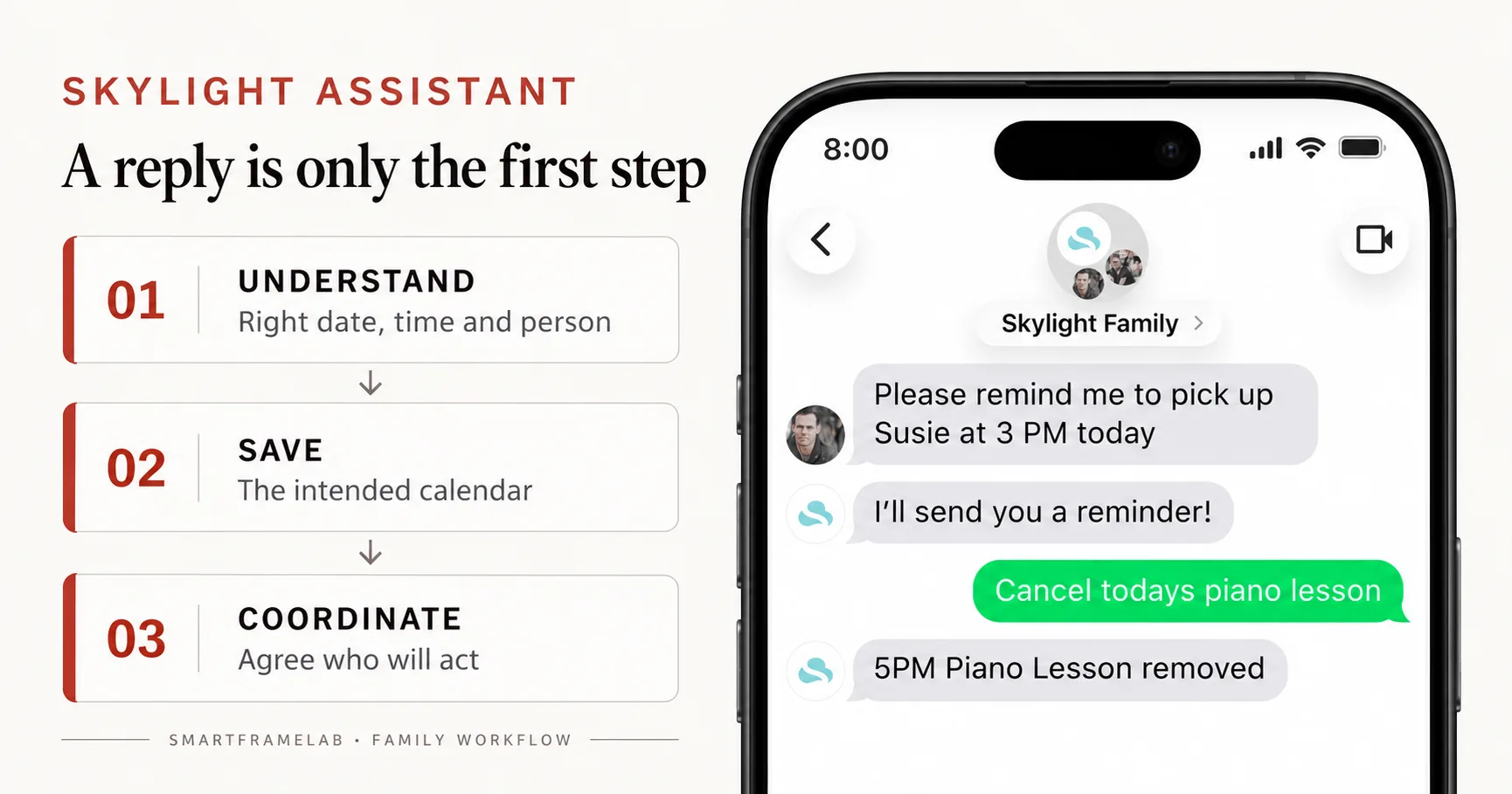
Quick answer
- No Skylight display is required. Official support currently limits Assistant to U.S. use in English; SMS group members must be 18 or older.
- Published prices are $14.99/month or $119.99/year, including Calendar Plus. Existing Plus customers are quoted a $40/year upgrade/add-on; actual conversion and credit depend on the billing route.
- Assistant is the SMS coordination service. Sidekick is the Plus app workflow for imports and planning. Buying Assistant does not buy a screen or improve its photo panel.
- Google and iCloud have documented two-way Skylight connections, but an SMS confirmation alone does not establish that an event reached the external calendar.
Research path
Continue your product research.
Compare connected products and practical use cases before deciding what fits your household.
Related reviews
- Skylight Calendar ReviewFamilies who want a polished shared calendar with broad mainstream support and do not want to run a DIY dashboard.
Watch notes and guides
- Is Skylight Plus Worth It? Cost, Free Features, and AlternativesDoes Skylight Calendar require Plus? Compare the current Plus cost, free calendar features, Magic Import, photos, meal planning, and no-subscription alternatives before checkout.
- AI Family Assistant DisplayA source-backed guide for deciding whether AI assistant features in smart calendar frames, family displays, and AI photo screens remove real family work or just add a new layer of setup and review burden.
- Smart Frame Subscription Costs ExplainedHow to compare free features, paid plans, AI extras, and ongoing household value before choosing a smart frame.
Feature matrix
Assistant, Plus and the screen
Source-based feature study Official Assistant, subscription, privacy and sync guidance checked October 26, 2026, alongside individual owner reports. Interface examples are Skylight promotional images. No authenticated SMS accuracy or household time-saving measurements are reported.
| Workflow | Main job | What the payment does not establish | Sources |
|---|---|---|---|
| Calendar core tools | Shared calendar, tasks and lists on the display/app. | A hardware purchase does not include every paid AI or photo feature. | Skylight Calendar hardware and Plus review |
| Calendar Plus / Sidekick | App-based imports, meal planning, rewards and photo screensaver. | Sidekick is not the separate SMS Assistant. Phone input does not require a microphone in the display. | Sidekick phone photo and voice workflowAssistant subscription and upgrade billing |
| Skylight Assistant | Text requests, shared rundowns and coordination prompts; Plus included. | No display included. No guarantee that every message writes to every connected calendar. | Assistant capabilities and limitsAssistant privacy, devices and supported regionsAssistant subscription and upgrade billing |
U.S. service descriptions checked October 26, 2026. Assistant eligibility and billing are separate from a hardware bundle’s dated Calendar Plus offer.
The useful job: turn a plan into an agreed handoff
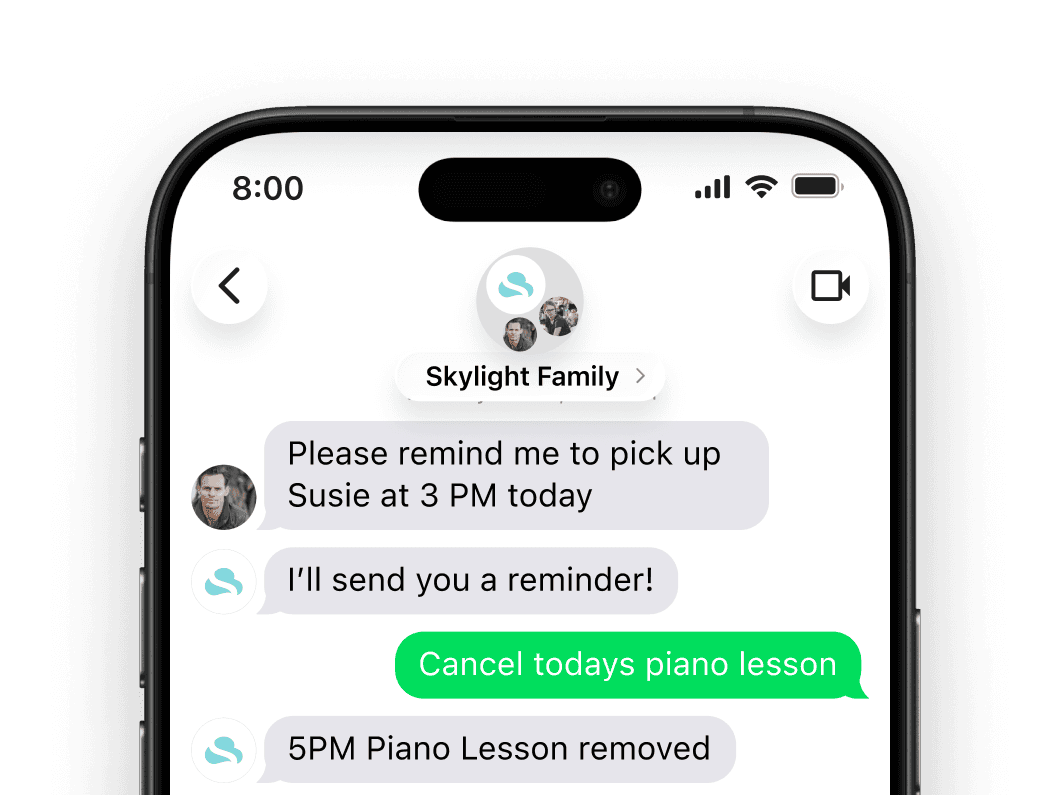
Skylight describes text-based event changes, nightly rundowns and follow-up on tasks. Its official example asks permission before messaging another adult about pickup. That is a useful distinction: noticing a tight transition is not the same as booking a ride or securing someone’s agreement. An adult still needs to accept responsibility.
- Good fit: adults already respond to texts, but one person keeps retyping reminders and chasing replies.
- Weak fit: the hard part is missing calendar information, conflicting permissions or a family member who ignores messages.
- The strongest result is fewer unresolved handoffs and fewer corrections. More messages alone are not evidence of less work.
Can you use it without the hardware—or without an app?
A device and a synced external calendar are optional: Assistant can use calendars in a Skylight account. Daily interaction is SMS. Setup is less uniform than the “no app” headline suggests: the public landing page currently shows a waitlist, while support describes starting a trial through the Skylight Mobile App. Confirm that Assistant is available in your account before assuming a universal sign-up path.
- Official support currently says United States only and English only. A U.S. product listing is not evidence of service in another country.
- The subscription FAQ permits unlimited participating family members aged 18+. Children can be subjects of a family schedule without being eligible SMS participants.
- Everyone in the Assistant group receives the same calendar events in the rundown. Choose the group and connected calendars with that visibility in mind.
What owner reports add—and what they cannot prove
In one owner discussion, a user describes using their phone’s voice assistant to dictate texts to Skylight and complete chores or add events. Another participant says reminders helped their partner contribute. The same discussion contains an upgrade-activation problem. These accounts make the appeal and setup friction concrete, but they are not an accuracy study or proof of today’s availability for every account.
- Dictating a text through Siri is a phone capability; it does not establish a built-in Skylight voice assistant.
- A single successful request cannot establish performance on recurring events, ambiguous names or time-zone changes.
- The practical question is whether a second adult contributes directly, rather than leaving one person to operate the assistant for everyone.
Google and Apple sync: check the destination, not just the reply
Skylight documents two-way Google and iCloud connections. Its Google instructions require the event’s synced-calendar destination; iCloud likewise needs the two-way connection and destination assignment. Assistant’s support lists those providers but does not document the complete SMS-to-provider routing behavior. Treat a conversational confirmation, an event in Skylight and an event in Google or Apple as separate checkpoints.
| Calendar source | Officially documented path | Buying implication | Sources |
|---|---|---|---|
| Google Calendar | Two-way connection; select the synced destination for newly created events. | Check the SMS-created event in Google itself, then edit it there and inspect Skylight. | Google two-way setup and destination |
| Apple iCloud | Two-way setup uses Apple two-factor authentication and an app-specific password; new events need a destination. | Avoid keeping duplicate one-way and two-way imports. Apple Calendar can display other accounts, so identify the actual source account. | Apple iCloud two-way setup |
| Outlook and calendar URLs | Assistant lists Outlook support; the general Skylight calendar guide lists Outlook and URL feeds under one-way paths. | Provider support is not a promise that SMS edits write back. Do not plan a work-calendar replacement around an assumed round trip. | Assistant privacy, devices and supported regionsSkylight provider and sync-direction guide |
Checked October 26, 2026. These are documentation boundaries, not measured SMS sync results or a promise of instant updates.
- For the household’s main calendar, confirm the date, time zone, recurrence and destination with a disposable event before relying on SMS entry.
Does the nightly rundown reduce the mental load?
Onboarding lets you choose the evening delivery time and invite other adults. A shared preview of tomorrow can prevent the familiar “I did not know about that” conversation. It only redistributes coordination if the recipients read it, spot conflicts and take ownership. A reminder that leaves the same person checking every detail may add another inbox instead.
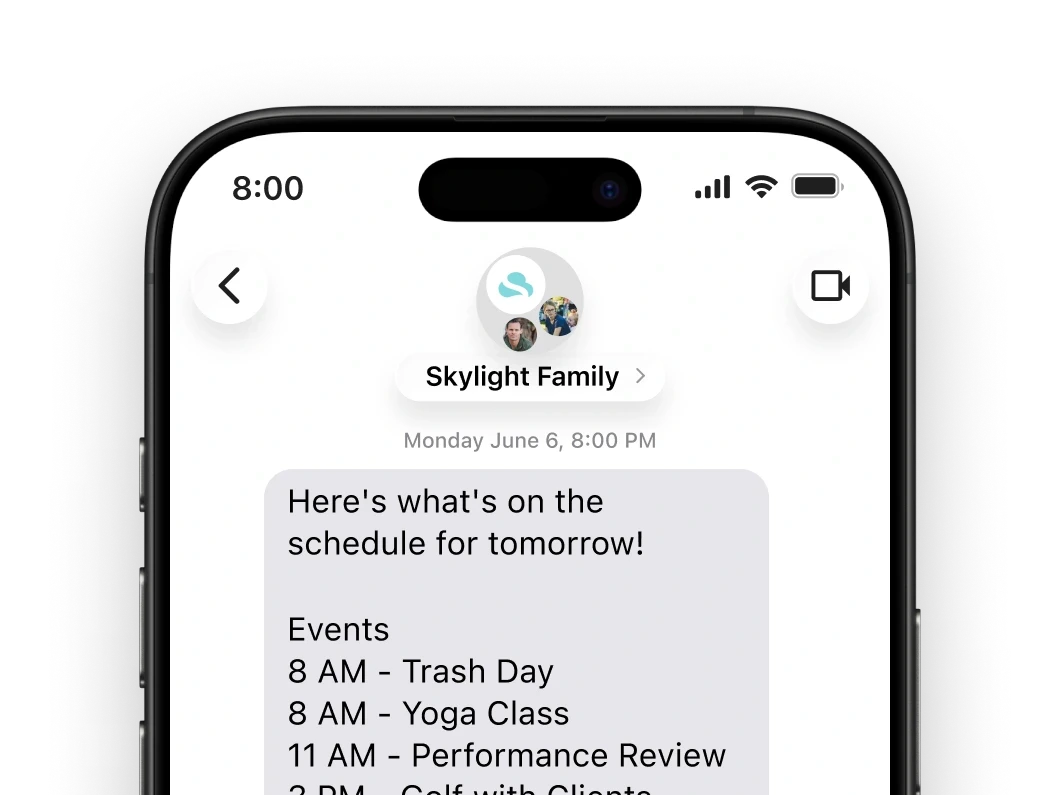
- Look for an explicit owner: “Jordan will collect Sam,” rather than a message that merely repeats the end time.
- Keep school collection and other time-critical responsibilities under adult control. A sent message is not proof that another adult has agreed.
- Use the rundown to identify missing information as well as conflicts; an assistant cannot summarize an appointment nobody entered.
What the subscription costs over time
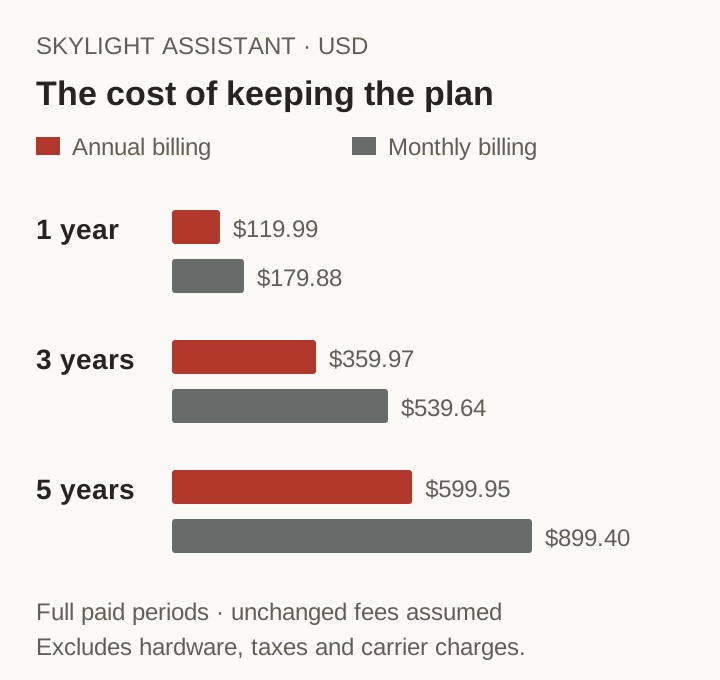
The annual plan costs $119.99; twelve monthly payments cost $179.88. Annual billing saves $59.89 against twelve paid months at the published rates. Monthly billing can still be reasonable for a short, busy season. Do not subtract a free-trial week from an annual renewal: compare actual payments and the cancellation deadline.
| Payment path | 1 paid year | 3 paid years | 5 paid years | Sources |
|---|---|---|---|---|
| Assistant annual: $119.99/year | $119.99 | $359.97 | $599.95 | Assistant subscription and upgrade billing |
| Assistant monthly: $14.99/month | $179.88 | $539.64 | $899.40 | Assistant subscription and upgrade billing |
| $40/year existing-Plus upgrade quote: incremental amount only | $40.00 | $120.00 | $200.00 | Assistant subscription and upgrade billing |
Arithmetic examples using full paid periods at unchanged rates. Excludes hardware, taxes, carrier charges, discounts and any existing Plus payments. The incremental upgrade row is not the total household bill.
- Plus is included with Assistant; a new subscriber does not need to buy both separately.
- For existing Plus owners, the FAQ quotes a $40/year add-on and also describes conversion to a $119.99 charge with a prorated refund of unused Plus time. Check the actual billing confirmation; do not assume two full ongoing subscriptions or an identical credit on every billing route.
- The Assistant FAQ values Plus at $79.99/year, while some hardware offers quote $79/year after a trial. Keep the selected offer and its source date separate.
The privacy question is about both storage and sharing
Skylight’s Assistant privacy FAQ says data is stored and managed on AWS in U.S. data centers, with U.S. operating vendors under a zero-retention standard for request processing. That vendor standard does not mean Skylight keeps no account history. Its cancellation FAQ says data remains after cancellation and deletion can be requested by email.
- The support FAQ says Assistant accesses information deliberately sent or connected, not all personal texts or email. It also describes human oversight for service support and improvement.
- The landing page’s broad “never share” message needs the support qualification: necessary service vendors do process information. This is a supplier policy statement, not an independent security audit.
- A group rundown can disclose a private appointment to every participant. Decide what belongs in a shared calendar before connecting it.
- Cancellation, data deletion and opting out of SMS are different actions. Replying STOP controls messages; use the documented subscription route to stop renewal.
Trial and cancellation: inspect the bill before testing the AI
The documented trial lasts seven days, requires a card and converts to a paid subscription unless canceled. Cancellation is available in the Skylight app or the iOS App Store, depending on the subscription route. The FAQ says access continues to the end of the paid period, ordinary cancellation has no refund and subscriptions cannot be paused. That is separate from the unused-Plus credit described for an upgrade.
- Before starting, note the renewal date, selected plan and cancellation location shown on your account.
- The general “my photos remain” message does not establish that every paid photo or AI function stays usable after the bundled plan expires.
- Use made-up appointments for initial checks. Do not connect a sensitive work calendar just to see whether texting is convenient.
A practical seven-day check before keeping the plan
Use the trial to answer a narrow question: does the assistant remove more coordination than it creates? The checks below are a buyer’s evaluation method, not results from a SmartFrameLab SMS session. Count correct outcomes and the corrections needed; a friendly response is not the outcome.
| Check | Example with invented data | Evidence to inspect | Sources |
|---|---|---|---|
| Plain-language entry | Add a practice on an explicit date, at 4 p.m., for 45 minutes. | Correct start/end, person, time zone and calendar destination. | Assistant setup and group rundown |
| Ambiguity and correction | Move the practice, then specify “this occurrence only.” | A clear clarification or the intended single edit, without changing the entire series. | Assistant seven-day trial |
| Round-trip sync | Create by SMS; edit in the connected source calendar. | Matching event in both places and no duplicate. Record elapsed time instead of assuming instant sync. | Google two-way setup and destinationApple iCloud two-way setup |
| Shared responsibility | Agree a pickup with another consenting adult. | The adult receives, understands and accepts it; fewer follow-up messages from the organizer. | Assistant setup and group rundownAssistant capabilities and limits |
Keep real children’s locations and private appointments out of initial tests. A useful score is correct completed outcomes divided by attempts, alongside correction count and elapsed time. No accuracy percentage is claimed here.
- Compare one ordinary week before and during use: unresolved handoffs, manual corrections, repeated reminders and time spent checking the assistant.
- Ask both adults whether it helped. Saving the organizer five taps while requiring another adult to handle more messages may not improve the household workflow.
Photos and the screen: do not pay for the wrong job
Assistant includes Plus benefits such as Photo Screensaver, but SMS coordination does not change a Calendar’s panel, resolution, color or reflections. A phone-only subscriber gains no physical photo display. If the main goal is better-looking family photos, compare the actual screen and photo-sharing workflow instead of using the Assistant price as a quality signal.
- Photo-based schedule import, a photo screensaver and photo quality are three separate questions. Keep original photos outside the display service.
Who should try Assistant—and who can skip it?
Consider a trial if you are an eligible U.S. household, the adults prefer SMS and recurring follow-up is a real source of friction. Existing Plus owners have the clearest incremental comparison: does the quoted upgrade remove a repeated job? Skip it if a shared calendar and ordinary reminders already work, the service is unavailable where you live, or private/group visibility does not fit your household.
- Keep the plan for demonstrably easier coordination, not merely because it can produce a polished nightly message.