
On this page
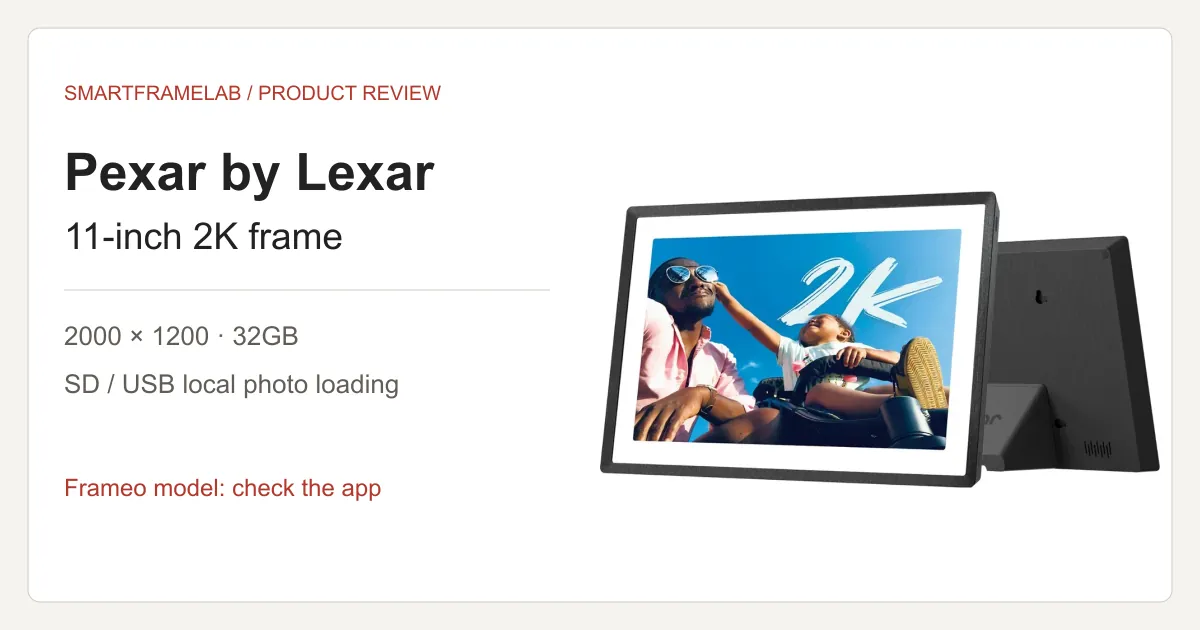
Is Pexar by Lexar worth it?
- Worth considering if local SD/USB loading and a detailed 11-inch display are priorities. Everyday Frameo photo sending is free; remote photo management and larger app batches are paid features.
- Match the app before buying. This review covers the Frameo-powered Pexar 2K 11-inch, not the Pexar-App VivKeep Pro 11-inch, even though both advertise 2000 × 1200.
- The original 11-inch model lacks automatic brightness adjustment. Its sharper specification also does not prove better color, glare control or visible detail than every cheaper Frameo frame.
SmartFrame Score
A strong photo-first choice for detailed shelf viewing and local SD/USB loading. Free core sharing keeps ownership costs low; manual brightness and paid remote administration limit its appeal as a hands-off gift.
- Photo Frame8.6 / 10
- Independent tests praise detail and natural color, supported by a 2000 × 1200 panel and flexible portrait placement. Automatic crops can cut subjects, direct light still causes reflections, and brightness is manual. The 8.6 reflects photo display, not measured color accuracy or superior video sound.
- Family Workflow7.6 / 10
- Free photo contributions, 32GB local storage and SD/USB loading suit a shared family slideshow. The recipient still handles touchscreen setup and permissions; remote library management and larger phone batches require Frameo+. Selected-photo sending is not automatic Google Photos album sync.
- Subscription Value8.4 / 10
- Core sharing and local playback need no recurring payment. Optional Frameo+ is $16.99/year, while Premium’s $69.99/year calendar package changes the value sharply. The published August 13, 2029 security-update cutoff and one-year hardware warranty constrain the long-term case.
- Calendar Sync5.8 / 10
- Current Frameo documentation supports one free synced calendar and a 15-minute refresh interval on compatible software. Multiple calendars and timed views cost extra. This is useful schedule visibility, with no established two-way provider editing or full household chore workflow.
- AI / Agent Readiness2.5 / 10
- Rotation, crop controls and display adjustments help presentation, but the documented feature set does not establish generative restoration, predictive scheduling or an AI household assistant.
An editorial assessment of the Frameo-powered 2K 11-inch PX-110, combining published hands-on tests from TechRadar and Tom’s Guide with current Pexar and Frameo documentation. The overall score judges its photo-frame role, rather than averaging the five dimensions. Pixel density, crop and cost comparisons are calculations; transfer speed and account-sync latency have no SmartFrameLab measurements. How we score
Buy the right 11-inch model first
Pexar’s current model guide separates the 2K 11-inch running Frameo from the VivKeep Pro 11-inch running the Pexar App. Plan terms and setup instructions follow the software, so an attractive 11-inch price alone is not enough to identify the purchase.
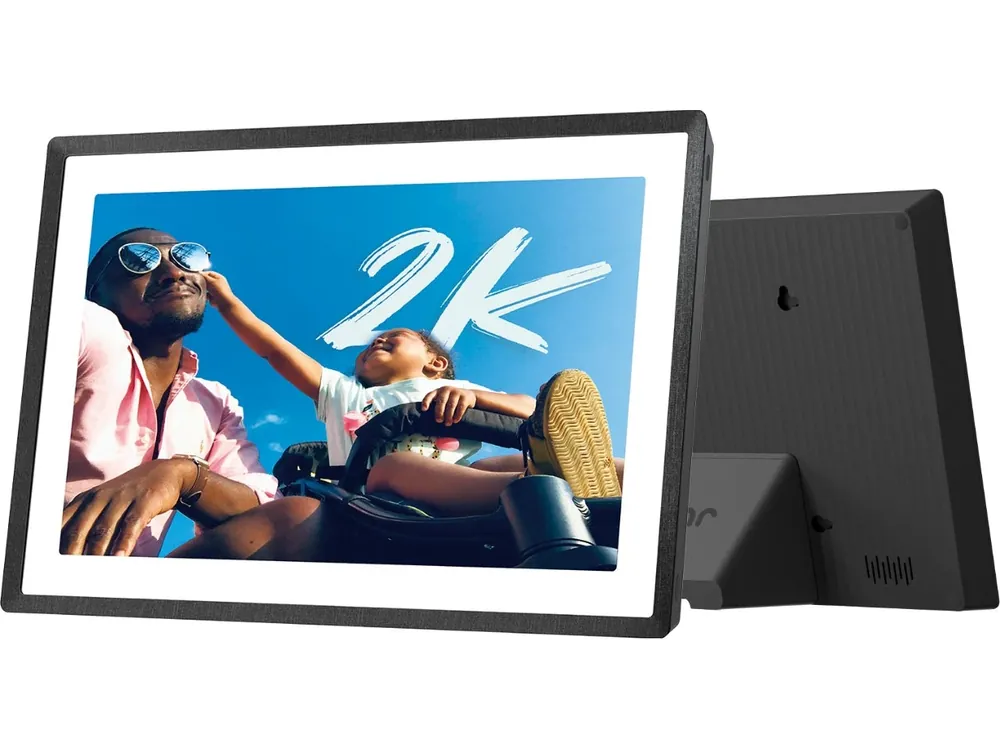
- The Frameo PX-110 has a 5:3, 2000 × 1200 touchscreen, 32GB storage and a magnetic stand for landscape or portrait placement. Lexar’s setup sheet specifies 2.4GHz Wi-Fi, USB-A flash-drive support and USB-C computer data transfer.
- Pexar’s current comparison marks automatic brightness adjustment as unavailable on both 11-inch models. Manual brightness and a sleep schedule serve different purposes from a light sensor.
- The frame needs its power adapter; it has no battery. Allow for a visible power cable on a shelf or wall.
How much sharper is 2K than 1080p?
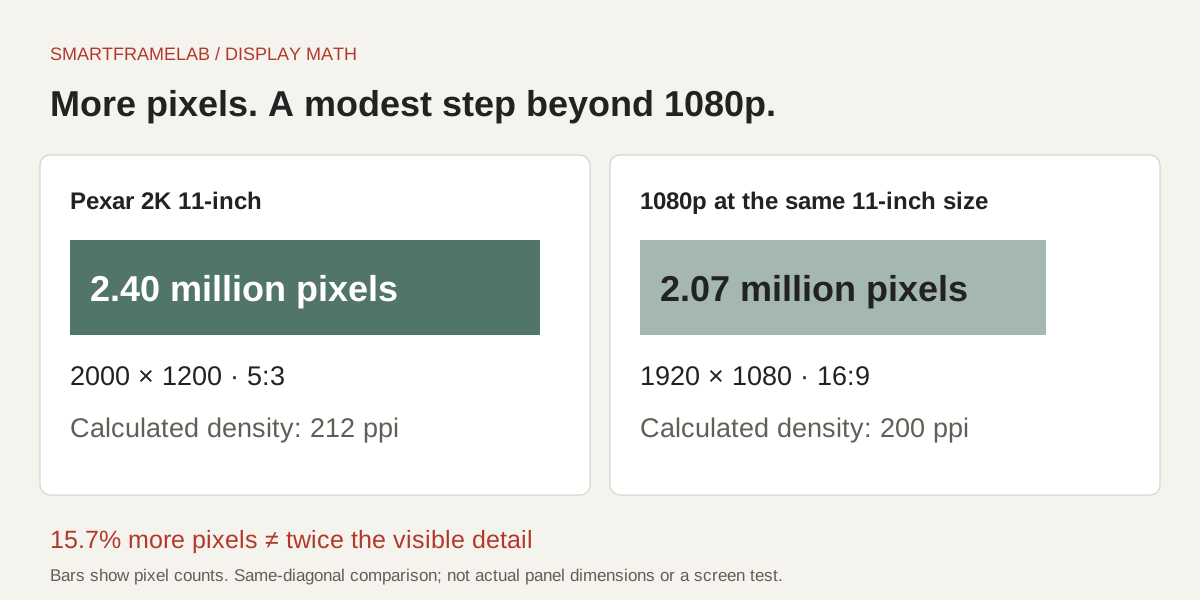
Pexar’s 2000 × 1200 panel contains 2.40 million pixels, versus 2.07 million for 1920 × 1080: about 15.7% more pixels, not twice as many. At the same hypothetical 11-inch diagonal, those resolutions work out to roughly 212 and 200 pixels per inch. The difference is useful to understand before paying a large premium for the 2K label.
- Pexar advertises 100% sRGB coverage, 400-nit brightness and an anti-glare finish. Coverage is not a measured color-accuracy result. A low-resolution or heavily compressed source photo cannot supply detail that is missing from the file.
- A 4:3 landscape image fitted to this 5:3 screen leaves 20% of the screen area unused. Filling the screen instead removes 20% of the photo area under proportional scaling. Frameo offers Fit to frame and Fill frame controls.
- Tom’s Guide’s September 2025 test praised the detail but found automatic crops could look wrong and direct light still caused glare. TechRadar’s two-week test, first reviewed in November 2024, likewise praised detail and natural color, but criticized imprecise cropping and thin speaker sound. Its reviewer had limited direct sunlight during testing; Tom’s Guide’s glare finding remains relevant to a bright shelf.
SD/USB import and direct playback
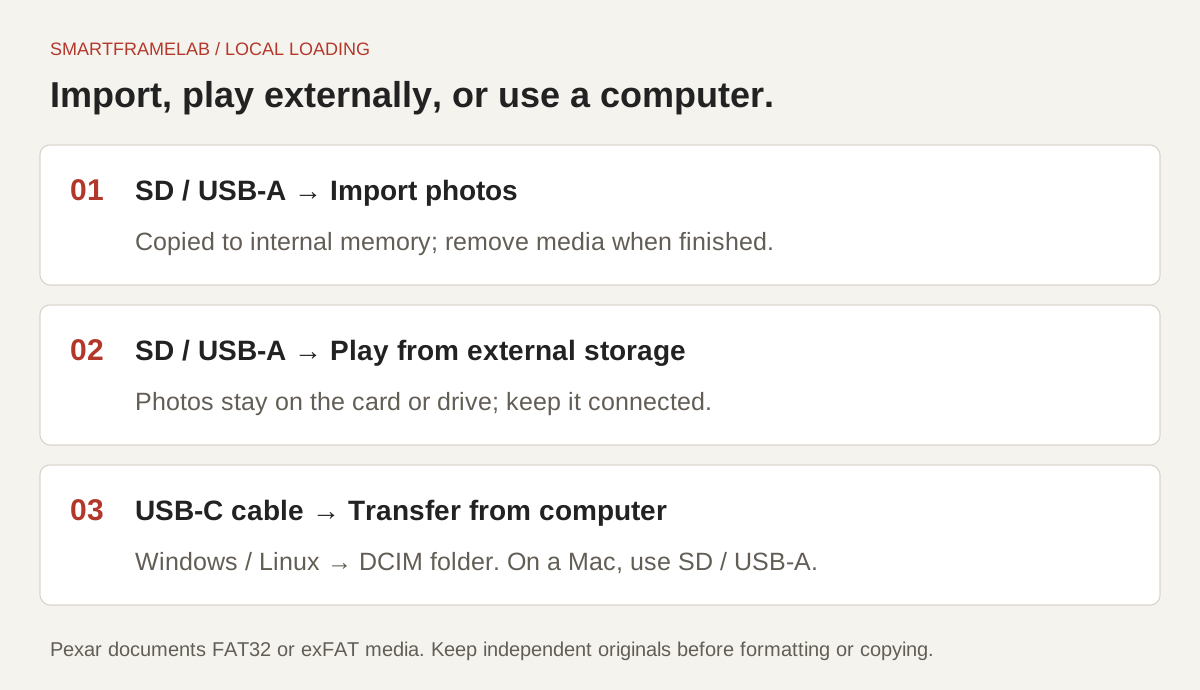
Pexar documents two useful paths: import files into internal storage, or play directly from external storage. The first lets you remove the card afterward; the second needs the card or drive to stay inserted. That distinction matters more than simply counting the ports.
- Lexar advertises expansion up to 1TB, with media sold separately. This does not turn the 32GB internal memory into a single 1TB internal library.
- Photo resolution and video decoding limits differ. Frameo’s import guidance for displays at or above 1080p caps imported video resolution at 1920 × 1080; a 2K photo panel is not a promise of 2K video playback.
- Prepare a spare SD card or USB-A drive in FAT32 or exFAT, with a small set of JPG or PNG images. Formatting erases the medium, so copy anything important elsewhere first.
- Insert it, then open Settings → Manage photos → Import photos. Select the pictures and tap the import arrow. Once copying finishes, the pictures are in internal storage.
- For playback without copying, choose Settings → Manage photos → Play from external storage and leave the medium connected.
- For a Windows or Linux computer, Pexar documents USB-C → Transfer from computer → enable transfer → copy to DCIM. Its direct cable method does not support macOS; use SD or a USB-A drive instead.
Is Frameo+ worth paying for?
For a few new family photos each week, start with Free. Frameo+ is more compelling when you want to manage pictures on a distant relative’s frame or send larger batches from your phone. Loading your initial collection by SD/USB can remove the main reason to pay merely for a larger first upload.
- Owners in a December 2025 discussion distinguished free sending from paid remote deletion. That is a useful buying question: contributing pictures and administering the recipient’s library are different jobs.
- Frameo+ belongs to the subscribing person’s account. It does not give every relative larger app batches. Remote viewing/management requires permission on the frame; cloud backup covers up to five frames.
- A locally stored slideshow reduces dependence on an online library. Optional cloud backup still creates a separate cloud copy; retain independent originals and limit contributor access to the people you intend.
| Plan | Photo-sharing boundary | Calendar allowance on compatible software | Sources |
|---|---|---|---|
| Free | Up to 10 photos per app batch; videos up to 15 seconds | One synced calendar | Frameo Free, Frameo+ and Premium |
| Frameo+ — $16.99/year | Up to 100 photos per app batch; two-minute videos; remote photo management and cloud backup | The Free calendar allowance | Frameo Free, Frameo+ and PremiumFrameo+ account and permission scope |
| Premium — $69.99/year | Frameo+ tools | Multiple calendars, countdowns and timed calendar views on up to five frames | Frameo Free, Frameo+ and Premium |
Published dollar prices checked October 28, 2026; regional in-app billing can differ. Paid plans have a 14-day trial that renews unless cancelled. The app’s batch/video limits are separate from removable-media import rules.
Calendar sync and AI: useful extras, with limits
Pexar now advertises a free calendar feature through Frameo, including Google, iCloud and Outlook connections. Frameo’s current plan page makes the boundary clearer: one synced calendar is free; several calendars and scheduled switching are Premium tools. Our Frameo Calendar guide explains the setup and provider differences.
- Frameo documents a 15-minute calendar refresh interval. This is a software specification, not a measured Pexar refresh time. Calendar visibility depends on compatible installed software and a successful provider connection.
- A displayed calendar and Frameo’s separate Send Events feature do not establish two-way editing back into Google or Apple calendars. One shared family calendar is also different from a household chore-and-reward system.
- Auto-rotation, crop adjustment and color-calibration claims do not establish generative photo restoration or AI scheduling. The buying case here is photo display and sharing.

Lexar branding, Pexar support and the update deadline
Keep the frame’s support route with the gift. Pexar’s warranty policy covers manufacturing/hardware defects for one year on qualifying direct or authorized-reseller purchases, with country and proof-of-purchase conditions. It excludes second-hand purchases. The policy identifies [email protected] as the contact; the Lexar name does not extend this into a memory-card-style lifetime warranty. Our Frameo buying guide separates the software provider from the hardware warranty.
- Pexar’s current support table lists August 13, 2029 as the security-update cutoff for the PX-110 running Frameo. It separately lists February 10, 2031 for the PX-110 running the Pexar App. The app distinction matters even when the model number is reused.
- Those are published support dates, not five fresh years from your purchase and not a claim that the display stops working afterward. Actual update delivery and hardware service experience were not tested here.
- Save the exact model/app, seller, invoice and return terms so the recipient can use the appropriate support route.
Three- and five-year cost
Using the Black variant’s official-store price of $149.99 on October 28, 2026, Free keeps the hardware-plus-required-plan subtotal at $149.99. A paid plan changes the total even though the frame itself does not require one.
- Add the actual cost of a card or drive, electricity, tax, delivery and any replacement hardware. A different sale price or color changes the starting figure.
- Frameo’s plan page says cancellation leaves existing photos and connections intact but removes cloud backups when the subscription expires. Keep originals outside the frame before depending on that backup.
| Plan choice | Three years | Five years | Sources |
|---|---|---|---|
| Free | $149.99 | $149.99 | Pexar 2K 11-inch official listingFrameo Free, Frameo+ and Premium |
| Frameo+ at $16.99/year | $200.96 | $234.94 | Pexar 2K 11-inch official listingFrameo Free, Frameo+ and Premium |
| Premium at $69.99/year | $359.96 | $499.94 | Pexar 2K 11-inch official listingFrameo Free, Frameo+ and Premium |
Arithmetic assumes unchanged annual prices and one eligible account subscription, with no trial adjustment. Excludes tax, accessories, electricity, repairs and replacement. A five-year cost example does not promise five further years of security updates; the Frameo PX-110 support date is stated above. Prices checked October 28, 2026, not a completed checkout.
Why Pexar earns 8.0—and how it compares
Pexar earns 8.0/10 for its combination of photo detail, local loading and free core sharing. Those benefits make a stronger photo-first ownership case than the Nixplay Modern W10K at 7.2/10, whose small free cloud allowance and paid connected albums add recurring constraints. Nixplay can still make sense for relatives already sharing through its ecosystem.
- HOMTURE MagicFrame scores 7.4/10 overall and emphasizes AI photo animation. Pexar is the simpler choice for a local photo library; choose HOMTURE for its creative tools, after comparing credit and subscription limits.
- The stronger photo and value scores do not make Pexar a better family-calendar organizer. Its 5.8 Calendar Sync score reflects one free calendar with limited workflow depth; the low AI score reflects the absence of documented assistant features.
- A light sensor, stronger remote administration or better cropping would improve the gift experience. Published screen tests support the photo recommendation, while transfer speed, provider authorization and sync latency remain unmeasured here.
Who should choose Pexar—and who should compare further?
Pexar is worth shortlisting for detailed photos at close shelf-viewing distance and practical local loading. Paying extra over a cheaper Frameo frame buys a different screen and hardware package; it does not automatically buy a more capable free app. Compare the Google Photos setup guide for automatic albums, or the Pix-Star review for remote web administration.
- Choose this Frameo model if you like its display specification, can use SD/USB for a large starting collection and are comfortable with the recipient handling occasional touchscreen settings.
- Frameo’s selected-photo sharing is not automatic Google Photos album synchronization. A household built around an updating Google album has a different need from occasional manual contributions.
- For a calendar-first purchase, compare family-calendar displays rather than assuming a small photo frame will cover every household task.
Device & software

Software platform: Frameo
The Pexar 2K 11-inch uses Frameo for photo sharing and optional calendar features. The similarly named VivKeep Pro 11-inch uses the Pexar App instead; its setup and subscriptions are separate.
Explore Frameo software and connected devicesRelationship sources: Pexar 2K 11-inch: Frameo app (checked 2026-10-29) · Pexar model and app comparison (checked 2026-10-29)
Four return-window checks
Use these checks with your own photos and room during the return window.
- Use the same detailed photo through the app and through SD/USB. At your normal viewing distance, compare fine detail, faces, reflections and a dark image; keep the crop setting the same.
- Import a known set of 100 non-sensitive JPG files. Record the time to completion, count the imported files and check a few before removing the medium. Test direct external playback separately.
- Check brightness in daylight and in a dark room. Confirm the manual setting and sleep schedule suit the recipient, rather than expecting a light sensor.
- Ask a remote contributor to send a photo, then confirm which viewing or management actions need a paid account and on-frame permission. Keep an independent backup of the originals.
Common questions
Does Pexar require a subscription?
The Frameo-powered 2K 11-inch supports free core photo sending and local loading. Frameo+ adds larger phone batches, longer app videos, remote photo management and cloud backup. Premium adds the broader calendar tools; these plans do not describe the Pexar-App VivKeep Pro 11-inch.
Can I load photos from a Mac?
Yes, through an SD card or USB-A drive. Pexar’s direct USB-C computer-transfer instructions are for Windows and Linux and explicitly exclude macOS.
Does the 11-inch Pexar automatically dim at night?
Pexar’s current model comparison marks automatic brightness adjustment as unavailable on the 2K 11-inch. It offers manual brightness and sleep scheduling; these do not provide light-sensor dimming.
Is 2000 × 1200 twice as sharp as 1080p?
No. It has about 15.7% more pixels than 1920 × 1080. At an equal 11-inch diagonal, calculated density is about 212 versus 200 ppi. Visible improvement also depends on the photo, scaling, crop and viewing distance.
Can Pexar show Google Calendar?
Pexar advertises Frameo calendar connections, and current Frameo plans include one synced calendar free on compatible software. Multiple calendars and timed views need Premium. See the Frameo Calendar guide for setup and limitations.
Sources
Related reading
Set up sharing and understand the account limits
Choose the workflow your family will keep using.
Photo sharing and ownership
- How to choose a Frameo photo frameExact models, free and paid software, storage and hardware support.
- Google Photos setup by frame brandAutomatic albums versus sending selected photos.
- Nixplay Modern 10.1-inch reviewCompare photo sharing, free storage and ongoing plan costs.
- Pix-Star LUX 10 reviewRemote web administration, multi-frame groups and local playback.