
Subscriptions / Updated November 15, 2026
Skylight Plus Prices: Which Plans Include Calendar, Frame, Assistant and Buddy?
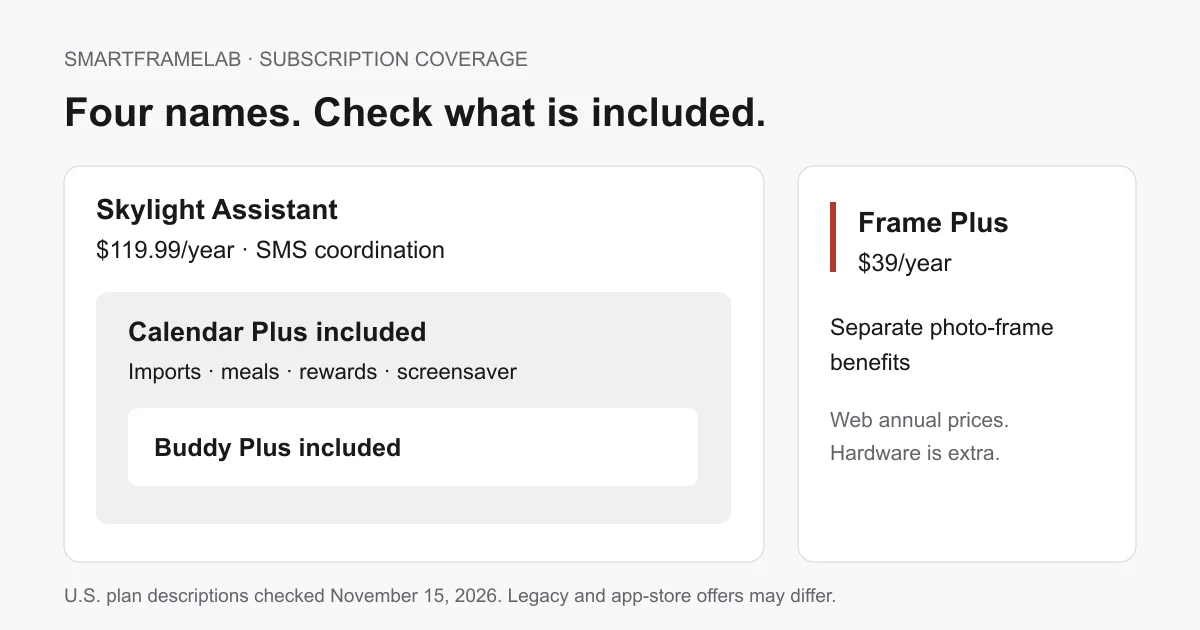
Assistant includes Calendar Plus and Buddy Plus. Frame Plus covers a different device family. Compare the free features, billing routes and upgrade costs before adding another plan.
Start with what you already pay for. A Calendar Plus household adding a Buddy already has Buddy Plus. An Assistant subscriber already has both. A photo Frame has its own premium plan. The four names describe different entitlements, but they do not require four independent payments.
Quick answer
- Calendar Plus is $79/year on the U.S. web page and includes Buddy Plus. You do not need a separate Buddy Plus subscription for that household.
- Assistant is $119.99/year or $14.99/month and includes Calendar Plus and Buddy Plus. Existing Calendar Plus users have an account-specific upgrade route.
- Frame Plus is $39/year on the web. Calendar’s photo screensaver and a separate photo Frame’s premium features belong to different plans.
- One current plan covers the corresponding device family in your Skylight Household. Link an existing entitlement before buying again.
Feature matrix
Four subscriptions and the coverage that overlaps
Feature study U.S. web plans, App Store purchase names and support instructions checked November 15, 2026. No account activation, cancellation or refund transaction was performed.
Scroll sideways to compare all columns. With a keyboard, focus the table and use the arrow keys.
| Plan | Web annual price | U.S. iOS purchase list | What it includes | Sources |
|---|---|---|---|---|
| Calendar Plus | $79/year | $7.99/month or $79/year | Calendar premium tools and Buddy Plus. | Calendar Plus U.S. annual priceU.S. App Store purchase listSkylight: plan inclusions and Household coverage |
| Frame Plus | $39/year | $3.99/month or $39/year; Skylight Plus Yearly also appears at $39.99 | Premium photo Frame features. Separate from Calendar Plus. | Frame Plus U.S. annual priceU.S. App Store purchase listSkylight: plan inclusions and Household coverage |
| Skylight Assistant / Assistant Plus | $119.99/year; $14.99/month also listed in support | $14.99/month or $119.99/year | SMS Assistant, Calendar Plus and Buddy Plus. | Assistant pricing, upgrades and creditsU.S. App Store purchase listSkylight: plan inclusions and Household coverage |
| Buddy Plus | $39/year | $3.99/month or $39.99/year | Buddy extras. Already included with Calendar Plus or Assistant. | Buddy Plus annual price and Calendar inclusionU.S. App Store purchase listSkylight: plan inclusions and Household coverage |
USD, before tax and hardware. These are published prices, not an authenticated checkout quote. Older purchase names, legacy rates, trials and retailer bundles can differ.
Estimate the plans you need
Select the premium jobs you want. Included Calendar and Buddy coverage is counted once.
Calendar Plus covers your Calendar and Buddy selections.
$79.00 per paid year
Three paid years $237.00 · Five paid years $395.00
Full paid periods at unchanged published rates. Excludes hardware, tax, trials, legacy rates, unused-time credits and upgrade offers. The calculator does not change or cancel a subscription. For older “Skylight Plus Yearly” purchases, use your receipt’s renewal price.
Why adding every price gives the wrong budget
Calendar Plus, Frame Plus and Assistant add up to $237.99 per year at the displayed web prices. But Assistant already includes Calendar Plus. For a new household that wants both SMS coordination and premium photo Frame features, the published combination is Assistant plus Frame Plus: $158.99 per year. Buddy Plus is included.
- Calendar premium tools plus Buddy extras cost $79/year on the web, rather than $118. Calendar Plus already covers Buddy Plus.
- If you only need shared calendar events, ordinary tasks and lists, start with Calendar’s free features. Basic photo sending to a Frame also works without Frame Plus.
- An App Store purchase name is not proof of a new mandatory fee. Compare the product, entitlement and billing account before subscribing.
Which feature belongs to which plan?
The same photo can meet two different paywalls. Showing it as a Calendar screensaver uses Calendar Plus. Sending it as a basic photo to a separate Frame is free, while Frame video, captions and albums are premium. Paying for Calendar’s screensaver does not buy premium management of every photo Frame.
| What you want to do | Free starting point | Premium coverage | Sources |
|---|---|---|---|
| View calendar events and ordinary tasks | Calendar basic | No Calendar Plus needed for these jobs. | Calendar Plus: basic and premium features |
| Import a school PDF or plan meals | Manual calendar/list entry | Calendar Plus, or Assistant with Calendar Plus included. | Calendar Plus: basic and premium featuresSkylight: plan inclusions and Household coverage |
| Show family pictures on Calendar | Calendar scheduling remains free | Calendar Plus screensaver, also included with Assistant. | Calendar Plus: basic and premium features |
| Email pictures to a photo Frame | Basic photo sending | Frame Plus for video, captions, albums and remote settings. | Frame Plus features |
| Send a message or visual timer to Buddy | Basic Buddy routines and alarms | Buddy Plus, Calendar Plus or Assistant. | Buddy free and premium featuresSkylight: plan inclusions and Household coverage |
| Coordinate pickups by SMS | Use your existing messaging/calendar tools | Assistant; hardware is optional. | Assistant pricing, upgrades and creditsAssistant eligibility and privacy |
A paid plan changes software access. It does not improve the physical panel’s resolution, color accuracy or viewing angles.
- Calendar Plus adds school-email or PDF imports, meal planning, recipes, rewards and the photo screensaver. Shared calendar, task and list functions are part of the basic device workflow.
- Frame Plus adds video, captions, albums and remote controls such as sleep schedule and display settings. Those controls can matter when helping a grandparent from another home.
- Buddy includes routines, chores, events, alarms and its nightlight without Plus. Buddy Plus adds rewards, messages and reminders, visual timers and more character customization.
- Assistant is an SMS coordination service for adult participants. Sidekick is Calendar Plus’s import and planning workflow. The Assistant study explains group visibility, privacy and calendar write-back.
Calendar sync does not require the SMS plan
The Calendar Plus comparison lists online sync in the basic tier. Google and iCloud have documented two-way routes; Outlook, Yahoo, Cozi and URL feeds bring events into Skylight. A paid SMS confirmation alone does not establish that a change has reached the original calendar.
- For a pickup change, check the event on both caregivers’ phones. With an incoming-only feed, make changes at the source. Assistant adds coordination and input methods, rather than a promise that every provider supports full write-back.
A family budget with a Calendar, two Buddies and a Frame
Suppose the kitchen Calendar needs meal planning, the two Buddies need reward tools, and a grandparent’s Frame needs video and remote settings. Calendar Plus and Frame Plus total $118/year on the web. The second Buddy does not add another Buddy Plus fee when it belongs to the covered Household.
- At unchanged prices, three complete paid years of that combination cost $354 and five cost $590, before hardware or tax.
- If the household chooses full-price Assistant instead, Assistant plus Frame Plus is $158.99/year, $476.97 over three paid years and $794.95 over five. Calendar and Buddy coverage is already included.
- The separate Household, ownership and management-email arrangements matter for gifts or co-parenting. A family relationship alone does not establish that devices in another account share the entitlement.
Already have Calendar Plus? Read the upgrade confirmation
Skylight’s Assistant FAQ lists a $40/year existing-Calendar-Plus add-on. It also describes a conversion that charges $119.99 and refunds unused Calendar Plus time. Those descriptions should not be combined into a promise that every customer pays the same amount today.
- The support example converts a $79 plan halfway through its year: a $119.99 Assistant charge and roughly $39.50 refunded. The initial cash charge and the eventual net amount are different.
- Check the current plan, unused-time credit, renewal date and payment method on your own upgrade screen. Save the confirmation before treating the old Calendar charge as a duplicate.
- If you have Legacy Skylight Plus, check its benefits and price with support before switching. Official guidance says subscribers from before February 2025 keep the legacy plan, but after unsubscribing must return at current rates. It does not establish a guaranteed route back after an Assistant conversion.
Paid already, but the app still asks for Plus?
Skylight links Frame and Calendar subscriptions to the management email used to buy them. A device activated under another address can display a paywall even when a suitable subscription exists. Start by finding the receipt and matching its plan name to the device.
- In My Skylight → Manage Subscriptions, check the active plan and its owning account. The linking instructions also describe Get Plus → Already subscribed, followed by the purchase email.
- Confirm that the receipt is for Calendar rather than Frame, and identify whether Apple, Google or Skylight took payment. Contact support if the entitlement remains missing after linking.
- For a gift, agree who will manage renewal and which Household owns the device. Paying for a second copy can conceal an activation problem rather than fix it.
Cancellation, refunds and stopping SMS
Find the seller on your receipt before canceling. Skylight says Apple and Google purchases must be managed through those stores. Web subscribers use the membership portal linked in their renewal email. An upgrade credit is a separate transaction from an ordinary cancellation refund.
- Assistant’s cancellation page says access continues through the paid period, ordinary refunds are not offered and subscriptions cannot be paused. Its documented unused-Calendar-Plus upgrade credit is a separate exception.
- Frame/Calendar’s cancellation FAQ says ordinary cancellation ends access immediately, while Apple/Google pre-cancellation retains access until expiration. Retailer bundles can have different renewal terms. Read the end date shown before confirming.
- Replying STOP unsubscribes from SMS messages. Use the subscription billing route to cancel renewal. Data deletion is another separate request.
- If you want a refund for an Apple or Google purchase, use that seller’s current refund process. Eligibility is account- and transaction-specific. A hardware return period does not establish the same refund right for subscription fees.
When is paying for an upgrade worth it?
Choose the smallest set of plans that covers jobs the family will repeat. If the screen mainly displays appointments and simple chores, basic Calendar may be enough. If meals and school-email imports remove weekly work, Calendar Plus is the first paid comparison. If adults need SMS follow-up, compare Assistant’s added cost against that specific job. The Plus buying guide covers the Calendar decision, while the Assistant study examines SMS accuracy, privacy and calendar behavior.
- Assistant currently supports the U.S. in English, with group participants aged 18 or older. A worldwide Skylight hardware purchase does not establish local Assistant eligibility.
- For a photo Frame gift, decide whether the sender needs videos and remote settings. Frame Plus software does not change photo sharpness, and this article does not measure image quality.
Source links
Related reading
Compare the products and setup options
Related reviews
- Skylight Calendar ReviewFamilies who want a polished shared calendar with broad mainstream support and do not want to run a DIY dashboard.
Watch notes and guides
- Skylight Buddy Product WatchSource-backed availability and early-review notes for Skylight Buddy, including price, ordering availability, core routines and Buddy Plus.
- Is Skylight Plus Worth It? Cost, Free Features, and AlternativesDoes Skylight Calendar require Plus? Compare the current Plus cost, free calendar features, Magic Import, photos, meal planning, and no-subscription alternatives before checkout.
- Smart Frame Subscription Costs ExplainedHow to compare free features, paid plans, AI extras, and ongoing household value before choosing a smart frame.